What is a CMS? Meaning, examples and how to choose
A CMS lets you manage your website yourself, without code. Discover what a CMS does, which systems exist and which one fits your business.
A CMS (content management system) is software that lets you manage the content of your website yourself, without knowing how to program. Editing texts, adding photos, creating new pages: it can all be done through an admin environment in your browser. Worldwide, 71.3% of all websites run on a CMS (W3Techs, 2026).
In this article you will learn what a CMS actually does, which systems exist, and above all: how to determine which CMS fits your business.
In short
A CMS lets you manage texts, photos and pages yourself, without technical knowledge.
WordPress is by far the most popular CMS: it runs on 42% of all websites and holds almost 60% market share among CMS users (W3Techs, 2026).
Which CMS is best depends on your goal: an informative website, a webshop or a custom application each require a different choice.
What does CMS mean?
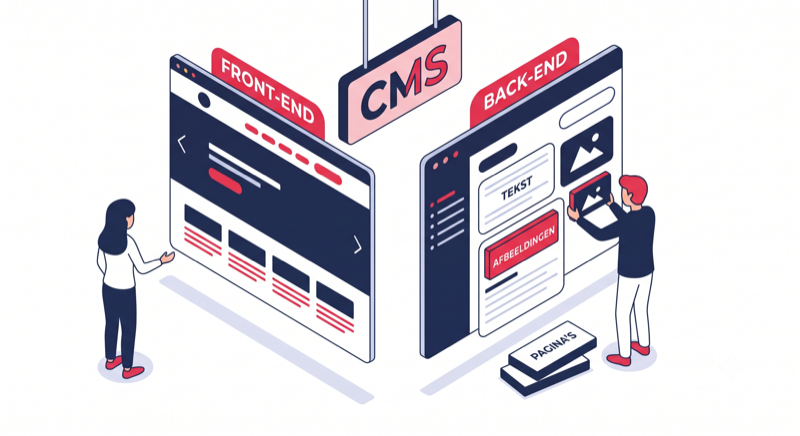
CMS stands for content management system. It is the program behind your website where you log in to edit the content. Think of it as the separation between the shop window and the stockroom: visitors see the shop window (your website), you work in the stockroom (the CMS) where you prepare and change everything.
Without a CMS, every text lives directly in the code of your website. Every change, however small, then has to be made by a developer. With a CMS you edit that text yourself, whenever it suits you.
A full-fledged CMS usually does three things:
Manage content: create and edit pages, blog articles, photos and videos
Define structure: organize menus, categories and the layout of your site
Manage permissions: decide who can change what, useful as soon as several people work on the site
Which CMS platforms are there? Six well-known examples
There are hundreds of CMS platforms, but in practice you keep running into a handful of them. WordPress dominates: it runs on 42% of all websites worldwide, accounting for almost 60% of the CMS market (W3Techs, 2026).
| CMS | Strong at | Typical for |
|---|---|---|
| WordPress | Flexibility, extensibility, SEO | Business websites, blogs, smaller webshops |
| WooCommerce | E-commerce within WordPress | SME webshops |
| Shopify | Start selling quickly | Webshops without custom needs |
| Joomla | More complex structures | Associations, portals |
| Drupal | Security, large organizations | Governments, universities |
| Wix / Squarespace | Build it yourself without knowledge | Starters with a small budget |
A notable shift: WordPress peaked at 43.6% mid-2025 and has been slipping slightly since, mainly due to the rise of SaaS platforms such as Shopify and Wix (W3Techs, 2026). For SMEs that want to remain the owner of their website and data, open source software like WordPress remains the logical choice.
Is WordPress a CMS?
Yes. WordPress is the most widely used content management system in the world. It started in 2003 as blogging software, but grew into a full-fledged CMS that lets you build any kind of website: from business websites and webshops to membership platforms.
The strength of WordPress lies in the combination of a free, open source base with tens of thousands of themes and plugins. At Onoweb we build most of our WordPress websites with it for SMEs, for one simple reason: clients can manage their own content after delivery, without receiving an invoice for every text change.
Keep in mind: WordPress is a starting point, not a finished product. The difference between a slow DIY site and a fast professional website lies in the craftsmanship behind it: a lightweight theme, a well-thought-out structure and a correct technical foundation.
Do you always need a CMS?
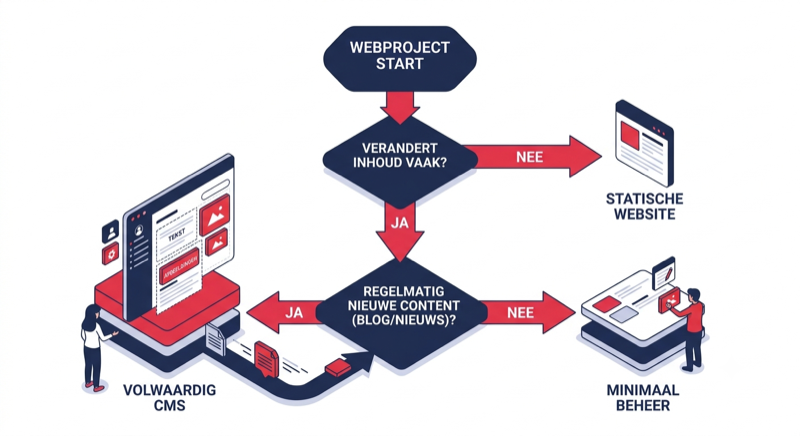
Usually yes, sometimes no. The rule of thumb: if the content of your website changes regularly, you want a CMS. If your site stays identical for years, a static website without a management system can suffice. In practice, almost three quarters of all websites choose a CMS (W3Techs, 2026), and that is no coincidence.
A CMS pays off as soon as you:
- want to edit texts and photos yourself without a developer
- regularly publish blog articles or news
- have a webshop where products and prices change
- work on the website with several people
There is also a middle ground. For applications with specific requirements we build custom websites where a CMS only manages the parts that really need to change. That way you keep speed and security, without giving up ease of management.
Which CMS do you choose for your business?
The right CMS depends on what your website needs to do, not on what is popular. A wrong choice costs you money later: a webshop on a system that cannot grow with you means starting over within two years.
This is how we reason on projects:
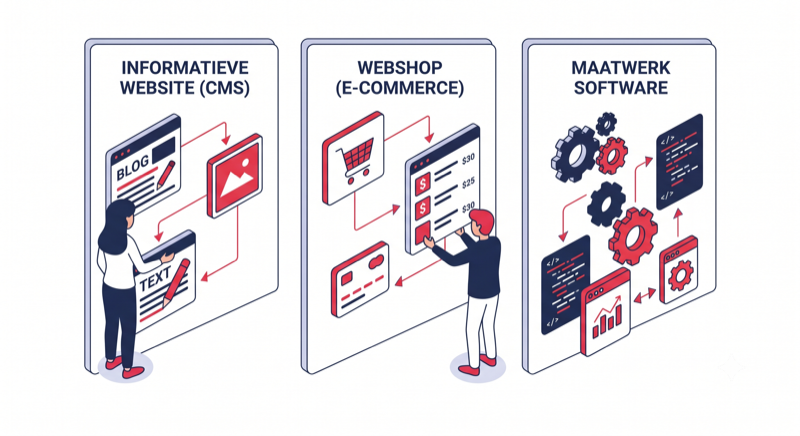
Informative business website? WordPress. Easy to manage yourself, strong for SEO and endlessly extensible. The best value for money for most SMEs.
Webshop? WooCommerce if you want flexibility and ownership, Shopify if you want to start quickly and monthly costs are not an issue. If you sell products with many options (think of a product configurator) or connect with an accounting package such as Exact Online, WooCommerce almost always wins. For sales processes that do not fit a standard webshop, there is also the custom webshop.
Digitalizing processes or unique functionality? Then you run into the limits of any standard CMS. For those cases we build custom software: an application that does exactly what your business needs, possibly with a CMS alongside it for the regular content.
In doubt? The question that gives direction fastest: what should your website be able to do within three years? Choose your CMS based on that answer.
What is a headless CMS?
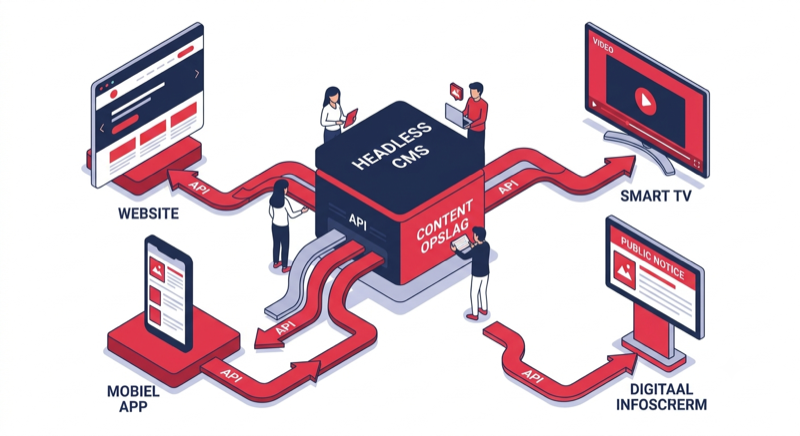
A headless CMS only manages the content and delivers it via a connection (API) to any front-end: a website, an app, even an information screen. The "head" (the website itself) is decoupled from the management system, hence the name.
For most SMEs headless is overkill: it requires more development work and a higher budget. It only becomes interesting once the same content has to appear in several places, for example on your website and in a mobile app. If you are facing such a scenario, you are talking about custom software rather than a classic website.
Conclusion: the CMS is the tool, not the result
A CMS gives you back control over your own website. For most SMEs WordPress is the most sensible choice, for webshops WooCommerce or Shopify, and for unique processes custom development. But the tool does not make the craftsman: the same CMS produces both slow DIY sites and fast websites that bring in customers. Curious what that looks like in practice? Check out our projects.
Not sure which CMS fits your plans? Schedule an introduction. In a 30-minute conversation we give you honest advice, even if that advice is that a simple solution will do.
Frequently asked questions about CMS platforms
Ready for an introductory meeting?
We listen to your idea, give honest advice, and afterwards you will know exactly if and how we can help you.
Schedule an introduction